Case study
Where Am I
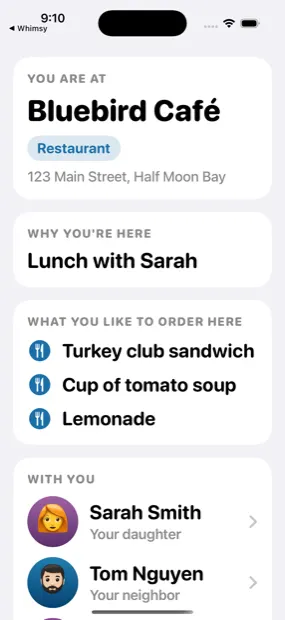
An app for people living with memory loss. One screen, very large type, and three questions: where am I, why am I here, who is with me.
- Platform
- iOS · Android
- Stack
- SwiftUI · Kotlin/Compose · Node · Postgres
- Status
- TestFlight, build 7
- Scale
- 3,700 lines Swift · 6,100 Kotlin · zero iOS dependencies
The problem
Someone with dementia becomes disoriented in a place they may well have chosen to go to an hour earlier. The questions they need answered are not the ones a maps app answers. They need where am I, why am I here, and who are these people — and they need them without navigating to anything.
The person using the app is usually not the person who set it up. Almost all setup is done by a family member, and that single fact shapes the entire configuration surface.
The shape of the answer
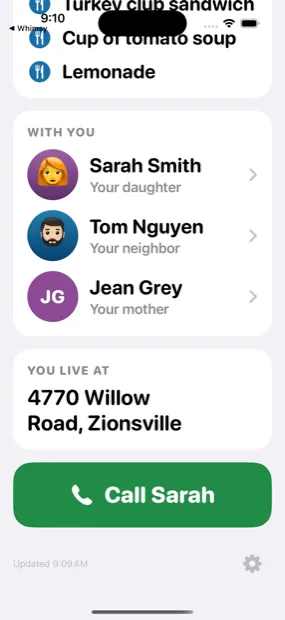
One screen. Three cards. Type large enough to read at arm’s length without glasses. One green Call button. No tab bar, no navigation, no dashboard.
The decision worth defending
No location on the server
“Who is with me” is the feature that would normally justify a location table. The obvious build is geo check-ins: phones post coordinates, the server computes proximity. That was the first implementation, and it was deleted rather than disabled — endpoints, table and all, with the smoke suite asserting 404s.
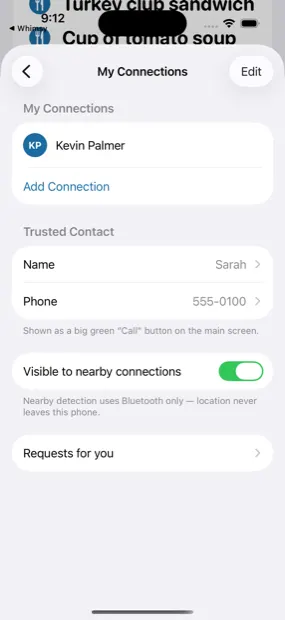
What replaced it is phone-to-phone Bluetooth with rotating daily tokens. The server issues each user a random 16-byte token per day and shares the mapping only with accepted connections. Phones advertise their token, read each other’s, and do the matching locally. Strangers see random bytes that rotate every day.
The claim this buys is unusually strong, and it is structural rather than a policy: the database has nowhere to put a location. A breach exposes names, emails, photos and a consent graph. It cannot expose where anyone has been, because that was never collected. The GPS fix on the device is one-shot, about 100 metres, and exists only to draw the place card. It is never uploaded.
Decisions
-
A wrong reason is worse than no reason
The “why am I here” card used to always render, falling back to “Nothing is on your calendar right now.” It now hides entirely unless a calendar event’s own location resolves to where the person is standing. Telling a disoriented person they are at a lunch happening somewhere else is actively harmful; a blank space is not.
-
A wrong place name is worse than an address
The place card only claims a business name when the fix is tight and the place is directly underfoot. Otherwise it shows the street address, which is never wrong, only less specific.
-
Date and time are deliberately absent
They are the obvious fourth thing to show, and the iOS Lock Screen already renders both in large type directly above the app’s Live Activity. Repeating them costs screen space and buys nothing.
-
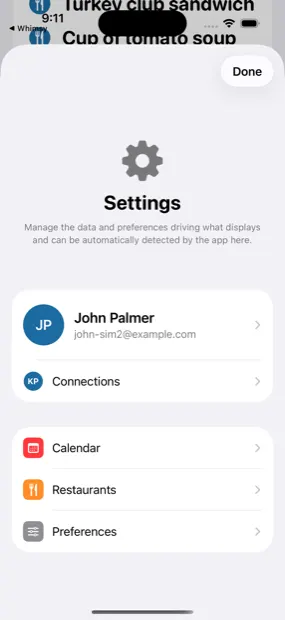
Settings hide behind a long press
A quick tap on the gear only shows a hint. The person the app is for must not be able to fall into configuration by accident — and a caretaker must not have to install a second app to reach it.
-
Both sides keep their own label
The requester writes “Anne Palmer’s son”; the accepter writes their own label back. The app always shows you your words. The label is required, not optional: a list of names is not useful to the person the app is for.
-
Permission prompts never fire without context
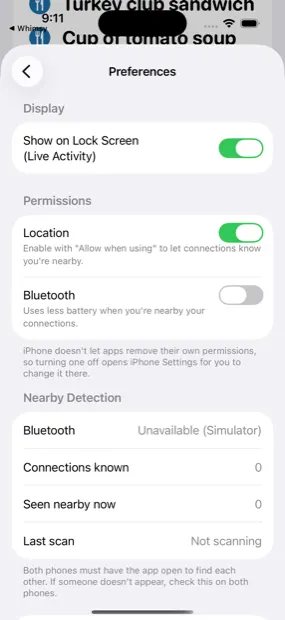
When Location or Bluetooth is missing, a large banner appears at the top of the main screen and deep-links into Settings. A cold system prompt to someone with memory loss is a dialog they cannot evaluate.
Engineering notes
-
One geocoding file
iOS 26 deprecated
CLGeocoderandMKMapItem.placemarkwhile the app still targets iOS 17. Rather than scatter#availableacross the codebase, every branch lives in one file and callers use four stable functions. The build is warning-clean and stays that way. -
About 150 lines of PKCE instead of an SDK
Google sign-in is hand-written, with no client secret and no dependency — which is also why the Android port reuses the same flow rather than integrating separately.
-
The Simulator cannot test the core feature
Neither the iOS Simulator nor the Android emulator has Bluetooth. The app reports “Unavailable (Simulator)” and degrades gracefully, and a diagnostics panel exposes Bluetooth state, tokens known, seen-nearby count and last scan — the only practical way to debug a radio protocol you cannot simulate.
Where it stands
iOS is on TestFlight at build 7 with an internal family group. Android builds and runs but is not on Play. The backend is live and stable behind a Cloudflare tunnel. Real two-phone Bluetooth behaviour remains the one thing only an install on real hardware can prove.
Screens